


For organizations adopting agents across Microsoft Dynamics 365 Customer Engagement (D365 CE) apps and Microsoft Dataverse, whether using native capabilities or custom copilots built in Microsoft Copilot Studio, governance connects what an agent is technically capable of doing with what the business has authorized it to execute. Here are seven steps to ensure agents are well governed before going live.
Give every agent a clear job
Governance starts with functional scoping. An agent helping a seller prepare for meetings has a clear operational scope. Conversely, an agent tasked vaguely to “improve customer engagement” introduces unpredictable prompt paths and operational risk. Define the specific business problem, expected outcomes, and where autonomous responsibility ends.
Assign an identified business owner to approve functional scope, review performance and validate knowledge sources. Staff must know who owns the agent when unexpected behaviors occur, embedding accountability directly into daily operations.
Keep access on a need-to-know basis
An agent should receive only the minimum access needed for its approved workload. Scrutinizing access is critical even in read-only scenarios where an AI summary can inadvertently expose confidential customer, financial or pipeline data without modifying a single Dataverse row.
In D365 CE and Dataverse, manage two distinct execution identities:
Interactive (delegated) context: when running on behalf of a signed-in user, the agent inherits that user’s Dataverse security roles, business unit hierarchy and column-level security.
Autonomous (application user) context: when running unattended in the background, the agent must use an Entra ID Service Principal paired with a dedicated Dataverse Application User assigned custom, least-privilege security roles.
Power Platform data loss prevention (DLP) policies govern which connectors (e.g., HTTP actions, external APIs) underlying flows can invoke, preventing CRM data exfiltration.
Decide when advice becomes action
Providing advice and executing a transaction carry fundamentally different risk. An agent might suggest an opportunity update, draft a case resolution or flag an overdue SLA. However, updating records or sending external emails creates immediate business impact requiring explicit authorization.
Establish three distinct tiers of authority per use case:
Assist (read and synthesize): the agent retrieves Dataverse records and drafts summaries or responses strictly for human review.
Act with approval (human-in-the-loop): the agent prepares an actionable payload such as an email or record update and pauses until an authorized person approves it.
Act independently (autonomous): the agent completes predefined, low-risk actions within deterministic thresholds (e.g., tagging duplicates or queuing internal tasks).
Make human approval a real decision
For high-impact or irreversible actions, human-in-the-loop review is mandatory. However, human review fails when users are inundated with vague notifications, creating rubber-stamping.
Power Automate approvals and adaptive cards in Microsoft Teams or Outlook provide native mechanisms for human sign-off. Ensure approval cards present full diagnostic context: the proposed record changes, underlying rationale and clear options to approve, edit or reject. Include timeout reassignments, so business operations never stall.
Keep business rules in charge
Deterministic business logic must always govern probabilistic AI generation. The same validation rules and authorization limits must apply whether a transaction is initiated by an employee or proposed by an agent.
Enforce non-negotiable boundaries through Dataverse synchronous plugins, business rules and classic workflows. Keep deterministic automation for routine rules and introduce AI where interpreting ambiguous text or synthesizing multi-source data adds genuine value.
Follow the action from request to result
When unexpected outcomes occur, audit teams require an immutable diagnostic trail. Governance requires recording who triggered the agent, prompt inputs, tool invocations, approvals and resulting database changes.
Leverage native Microsoft observability tools:
- Dataverse auditing: enable auditing on critical tables and columns to capture values, timestamps and executing identities.
- Power Automate run history: monitor cloud flow execution paths, API payloads and error rates.
- Copilot Studio analytics and Microsoft Purview: review conversation transcripts, deflection metrics and Purview audit logs for prompt security and compliance.
- Operational circuit breaker: establish clear protocols allowing administrators to pause or disable an agent immediately upon detecting anomalies.
Expand authority when results support it
Enterprise AI adoption is an empirical discipline. Begin with a bounded, high-value pilot. Track efficiency gains alongside exception rates, human overrides and user corrections. Elevate an agent’s authority only when operational evidence demonstrates sustained reliability. User feedback turns daily edge cases into ongoing governance improvements.
Governance control summary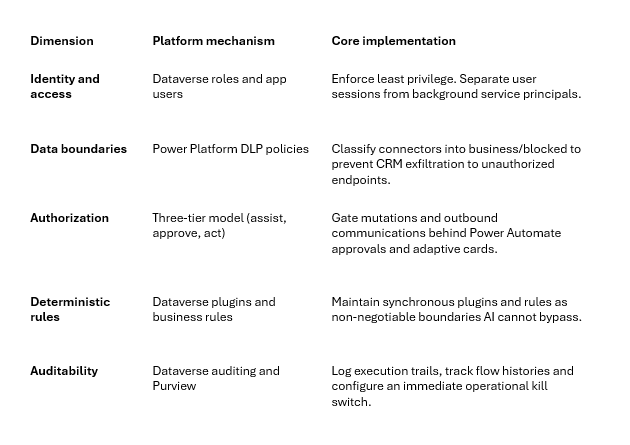
A Practical Starting Point
Before scaling AI agents across D365 CE, evaluate five core questions:
- Scope: is the agent’s task clearly defined with explicit operational boundaries?
- Permissions: is the agent constrained by least-privilege Dataverse roles and DLP rules?
- Authority: are high-impact actions gated behind human approvals and business rules?
- Accountability: is there an immutable audit trail and a designated owner with kill-switch authority?
- Resilience: if something goes wrong, can the team detect the issue, pause the agent, continue critical work manually and recover safely?
Answering these questions transforms AI adoption from an operational risk into a secure enterprise advantage.
To learn more about our Microsoft consulting services, contact us.