


At Protiviti, we use Adobe Workfront within our marketing team for project planning, tracking and analytics. It is our go-to platform for submitting requests, managing assets and keeping work organized across the team. Workfront has helped improve both our planning speed and traceability within marketing.
With our Workfront implementation, there was one challenge our team kept running into – not everything lives in Workfront. And although great for team management and assigning work, what happens when critical information originates in a tool to which Workfront does not natively connect? How do we, as a team, quickly resolve issues to ensure continuity across teams and systems?
Our challenge: Adobe Workfront Fusion meets BugHerd
Our Protiviti web development team uses BugHerd, a visual feedback and bug-tracking tool, to receive feedback on Protiviti-owned sites. When a developer spots an issue, they use the widget to create a ticket and the team is notified instantly. The tool is intuitive, fast and the development team genuinely enjoys using it.
But here is where the friction started. The development team leverages BugHerd to capture feedback. The marketing team uses Adobe Workfront to manage work. The two tools did not talk to each other, and the two teams were managing two disparate systems. As a result, our web team was manually copying ticket details out of one UI (BugHerd) and re-entering them into another (Workfront), spending valuable time on data entry instead of fixing actual issues.
This is not a problem unique to BugHerd. That gap between where information is captured and where work is managed is where things fall through the cracks for teams working together. Every organization has tools that generate work outside of its system of record, whether it’s a QA tool like BugHerd logging a bug, a client submitting feedback through a Workfront portal, or a monitoring service flagging an incident. The information starts in one place, but the work happens somewhere else.
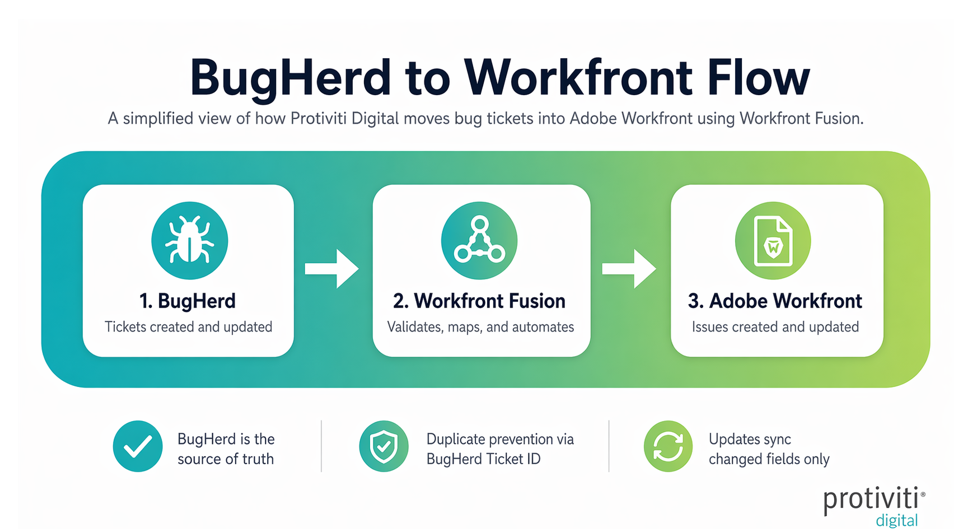
To bridge the divide between the two systems, Protiviti built a BugHerd-Workfront Fusion integration. Our developers continue to use BugHerd to track issues and pin feedback directly on the site. Adobe Workfront Fusion then routes those tickets into a Workfront request queue where the web team can assign them to be fixed.
The Fusion solution can identify when a BugHerd ticket is new or has been updated. It then maps priorities between the two systems, automatically attaching screenshots directly to the Workfront Issue log and pre-fills intake form fields so tickets arrive in Workfront ready for triage. The web or marketing teams can then open their Workfront queue and everything needed is there, including who reported it, what page it is on, a visual of the issue and a link back to BugHerd for the full interactive view.
Improving velocity within teams
For developers , every ticket arrives with full context so they can start working immediately without chasing down details, increasing velocity and time of completion of tasks.
For marketing project managers, all feedback-driven work is now visible in Adobe Workfront alongside every other marketing initiative. Reporting on volume, turnaround times and trends is all in the system of record, allowing for quick analysis and dashboarding.
Creating an integration hAEM ub with Workfront Fusion to address Protiviti’s BugHerd–Workfront challenge is one example of disparate tools being used to operationally manage jobs within teams. Organizations invest in best-in-class tools for specific jobs, such as bug tracking, design review, DevOps and analytics, but ultimately struggle to connect them into a single system of record for multi-disciplinary teams. The work gets done, but the visibility, reporting and accountability suffer because data is scattered across multiple platforms that were never designed to talk to each other.
Protiviti has worked with Workfront Fusion on the following integration patterns:
- Connecting bug tracking tools like BugHerd to Workfront request queues, creating Issues automatically from external feedback.
- Enabling two-way syncs between Azure DevOps or Jira and Adobe Workfront, keeping engineering and creative teams aligned across their respective tools.
- Triggering Microsoft Teams or Slack notifications from Workfront status changes, so teams stay informed without checking dashboards.
- Connecting AEM as a Cloud Service and Edge Delivery websites to Adobe Workfront so that when new content goes live, such as a newly created or updated page being available for preview, it automatically creates or updates review tasks and keeps content and project tracking aligned.
How to supercharge Adobe Workfront
Protiviti specializes in Adobe Workfront Fusion integrations across the Adobe ecosystem and beyond. Whether connecting Workfront to a bug tracker, a DevOps pipeline, a CMS or a reporting platform, our integration specialists can design and build a solution tailored to any organization’s workflow.
To learn more about our Adobe consulting services, contact us.